skip to main |
skip to sidebar

Option Explicit
'Author: YukiukiH
'Date: 10/08/2008
'compatibility: Rhino4
''boundary CONE
'----------------------------------------------------------------------------------------------
Dim strTrgPt, arrTrgPt
strTrgPt = Rhino.GetObject ("select a target point", 1)
Dim strALLRefPts
strALLRefPts = Rhino.GetObjects ("select reference points", 1)
Dim strPtDir, arrPtDir, arrDirVector
strPtDir = Rhino.GetObject ("select a point for direction", 1)
Dim strRefPts
strRefPts = boundaryCone (strTrgPt, strALLRefPts, strPtDir, 400, 30)
'color
Dim intR, intG, intB
Dim i
For i = 0 To UBound(strRefPts)
intR =255
intG =25+i*Rnd()*2
intB =0
Call Rhino.ObjectColor (strRefPts(i), RGB(intR, intG, intB))
Next
Call Rhino.print("execution completed")
'----------------------------------------------------------------------------------------------
'----------------------------------------------------------------------------------------------
Function boundaryCone (strTrgPt, strALLRefPts, strPtDir, dblBoundCos, dblBoundAngle)
Dim arrResult
'coordinate extraction
'----------------------------------------------------------------------------------------------
Dim arrTrgPt
arrTrgPt = Rhino.PointCoordinates (strTrgPt)
Dim arrALLRefPts()
Dim i
For i = 0 To UBound(strALLRefPts)
ReDim Preserve arrALLRefPts(i)
arrALLRefPts(i) = Rhino.PointCoordinates (strALLRefPts(i))
Next
Dim arrPtDir
arrPtDir = Rhino.PointCoordinates (strPtDir)
'set boundary
'---------------------------------------
Dim arrLine1(1), arrLine2(1)
Dim dblAngles, dblVectorLength, dblDist
Dim arrREFPts(), strRefPts()
Dim n, m
n = 0
For m = 0 To UBound(arrALLRefPts)
arrLine1(0) = arrPtDir
arrLine1(1) = arrTrgPt
arrLine2(0) = arrALLRefPts(m)
arrLine2(1) = arrTrgPt
dblAngles = Rhino.Angle2 (arrLine1, arrLine2)
If dblAngles(0) < dblBoundAngle Then
dblVectorLength = Rhino.Distance (arrALLRefPts(m), arrTrgPt)
dblDist = dblVectorLength *Cos(dblAngles(0)*2*dblPi/360) 'cone
If dblDist < dblBoundCos Then
Call Rhino.Print ("through point: " & CStr(n+1))
ReDim Preserve arrRefPts(n)
arrRefPts(n) = arrALLRefPts(m)
ReDim Preserve strRefPts(n)
strRefPts(n) = strALLRefPts(m)
n = n+1
End If
End If
Next
'---------------------------------------
arrResult = strRefPts
boundaryCone = arrResult
End Function
'----------------------------------------------------------------------------------------------
'----------------------------------------------------------------------------------------------

Option Explicit
'Author: YukiukiH
'Date: 10/08/2008
'compatibility: Rhino4
''boundary PARTIAL SPHERE
'----------------------------------------------------------------------------------------------
Dim strTrgPt, arrTrgPt
strTrgPt = Rhino.GetObject ("select a target point", 1)
Dim strALLRefPts
strALLRefPts = Rhino.GetObjects ("select reference points", 1)
Dim strPtDir, arrPtDir, arrDirVector
strPtDir = Rhino.GetObject ("select a point for direction", 1)
Dim strRefPts
strRefPts = boundaryPartialSphere (strTrgPt, strALLRefPts, strPtDir, 450, 30)
'color
Dim intR, intG, intB
Dim i
For i = 0 To UBound(strRefPts)
intR =255
intG =25+i*Rnd()*2
intB =0
Call Rhino.ObjectColor (strRefPts(i), RGB(intR, intG, intB))
Next
Call Rhino.print("execution completed")
'----------------------------------------------------------------------------------------------
'----------------------------------------------------------------------------------------------
Function boundaryPartialSphere (strTrgPt, strALLRefPts, strPtDir, dblBoundR, dblBoundAngle)
Dim arrResult
'coordinate extraction
'---------------------------------------
Dim arrTrgPt
arrTrgPt = Rhino.PointCoordinates (strTrgPt)
Dim arrALLRefPts()
Dim i
For i = 0 To UBound(strALLRefPts)
ReDim Preserve arrALLRefPts(i)
arrALLRefPts(i) = Rhino.PointCoordinates (strALLRefPts(i))
Next
Dim arrPtDir
arrPtDir = Rhino.PointCoordinates (strPtDir)
'set boundary
'---------------------------------------
Dim dblDist, dblAngles, arrDir
Dim arrLine1(1), arrLine2(1)
Dim arrREFPts(), strRefPts()
Dim n, m
n = 0
For m = 0 To UBound(arrALLRefPts)
dblDist = Rhino.Distance (arrTrgPt, arrALLRefPts(m))
If dblDist < dblBoundR Then
arrLine1(0) = arrPtDir
arrLine1(1) = arrTrgPt
arrLine2(0) = arrALLRefPts(m)
arrLine2(1) = arrTrgPt
dblAngles = Rhino.Angle2 (arrLine1, arrLine2)
If dblAngles(0) < dblBoundAngle Then
Call Rhino.Print ("through point: " & CStr(n+1))
ReDim Preserve arrRefPts(n)
arrRefPts(n) = arrALLRefPts(m)
ReDim Preserve strRefPts(n)
strRefPts(n) = strALLRefPts(m)
n = n+1
End If
End If
Next
'---------------------------------------
arrResult = strRefPts
boundaryPartialSphere = arrResult
End Function
'----------------------------------------------------------------------------------------------
'----------------------------------------------------------------------------------------------

Option Explicit
'Author: YukiukiH
'Date: 10/08/2008
'compatibility: Rhino4
''boundary SPHERE
'----------------------------------------------------------------------------------------------
Dim strTrgPt
strTrgPt = Rhino.GetObject ("select a target point", 1)
Dim strALLRefPts
strALLRefPts = Rhino.GetObjects ("select reference points", 1)
Dim strRefPts
strRefPts = boundarySphere (strTrgPt, strALLRefPts, 250)
'color
Dim intR, intG, intB
Dim i
For i = 0 To UBound(strRefPts)
intR =255
intG =25+i*Rnd()*2
intB =0
Call Rhino.ObjectColor (strRefPts(i), RGB(intR, intG, intB))
Next
Call Rhino.print("execution completed")
'----------------------------------------------------------------------------------------------
'----------------------------------------------------------------------------------------------
Function boundarySphere (strTrgPt, strALLRefPts, dblBoundR)
Dim arrResult
'coordinate extraction
'---------------------------------------
Dim arrTrgPt
arrTrgPt = Rhino.PointCoordinates (strTrgPt)
Dim arrALLRefPts()
Dim i
For i = 0 To UBound(strALLRefPts)
ReDim Preserve arrALLRefPts(i)
arrALLRefPts(i) = Rhino.PointCoordinates (strALLRefPts(i))
Next
'set boundary
'---------------------------------------
Dim dblDist, arrREFPts(), strRefPts()
Dim n, m
n = 0
For m = 0 To UBound(arrALLRefPts)
dblDist = Rhino.Distance (arrTrgPt, arrALLRefPts(m))
If dblDist < dblBoundR Then
Call Rhino.Print ("through point: " & CStr(n+1))
ReDim Preserve arrRefPts(n)
arrRefPts(n) = arrALLRefPts(m)
ReDim Preserve strRefPts(n)
strRefPts(n) = strALLRefPts(m)
n = n+1
End If
Next
'---------------------------------------
arrResult = strRefPts
boundarySphere = arrResult
End Function
'----------------------------------------------------------------------------------------------
'----------------------------------------------------------------------------------------------

Option Explicit
'Author: YukiukiH
'Date: 10/08/2008
'compatibility: Rhino4
''boundary CYLINDER
'----------------------------------------------------------------------------------------------
Dim strTrgPt
strTrgPt = Rhino.GetObject ("select a target point", 1)
Dim strALLRefPts
strALLRefPts = Rhino.GetObjects ("select reference points", 1)
Dim strRefPts
strRefPts = boundaryCylinder (strTrgPt, strALLRefPts, 200, 400)
'color
Dim intR, intG, intB
Dim i
For i = 0 To UBound(strRefPts)
intR =255
intG =25+i*Rnd()*2
intB =0
Call Rhino.ObjectColor (strRefPts(i), RGB(intR, intG, intB))
Next
Call Rhino.print("execution completed")
'----------------------------------------------------------------------------------------------
'----------------------------------------------------------------------------------------------
Function boundaryCylinder (strTrgPt, strALLRefPts, dblBoundR, dblBoundZ)
Dim arrResult
'coordinate extraction
'---------------------------------------
Dim arrTrgPt
arrTrgPt = Rhino.PointCoordinates (strTrgPt)
Dim arrALLRefPts()
Dim i
For i = 0 To UBound(strALLRefPts)
ReDim Preserve arrALLRefPts(i)
arrALLRefPts(i) = Rhino.PointCoordinates (strALLRefPts(i))
Next
'set boundary
'---------------------------------------
Dim arrFlatPt, arrFlatRefPt, dblDist, dblmaxZ, dblminZ
Dim arrREFPts(), strRefPts()
dblmaxZ = arrTrgPt(2) + dblBoundZ
dblminZ = arrTrgPt(2)
Dim n, m
n = 0
For m = 0 To UBound(arrALLRefPts)
arrFlatPt = Array(arrTrgPt(0), arrTrgPt(1), 0)
arrFlatRefPt = Array(arrALLRefPts(m)(0),arrALLRefPts(m)(1), 0)
dblDist = Rhino.Distance (arrFlatPt, arrFlatRefPt)
If dblDist < dblBoundR Then
If dblmaxZ>arrALLRefPts(m)(2) And arrALLRefPts(m)(2)>dblminZ Then
Call Rhino.Print ("through point: " & CStr(n+1))
ReDim Preserve arrRefPts(n)
arrRefPts(n) = arrALLRefPts(m)
ReDim Preserve strRefPts(n)
strRefPts(n) = strALLRefPts(m)
n = n+1
End If
End If
Next
'---------------------------------------
arrResult = strRefPts
boundaryCylinder = arrResult
End Function
'----------------------------------------------------------------------------------------------
'----------------------------------------------------------------------------------------------

Option Explicit
'Author: YukiukiH
'Date: 10/08/2008
'compatibility: Rhino4
''boundary CUBE
'----------------------------------------------------------------------------------------------
Dim strTrgPt
strTrgPt = Rhino.GetObject ("select a target point", 1)
Dim strALLRefPts
strALLRefPts = Rhino.GetObjects ("select reference points", 1)
Dim strRefPts
strRefPts = boundaryCube (strTrgPt, strALLRefPts, 300, 300, 400)
'color
Dim intR, intG, intB
Dim i
For i = 0 To UBound(strRefPts)
intR =255
intG =25+i*Rnd()*2
intB =0
Call Rhino.ObjectColor (strRefPts(i), RGB(intR, intG, intB))
Next
Call Rhino.print("execution completed")
'----------------------------------------------------------------------------------------------
'----------------------------------------------------------------------------------------------
Function boundaryCube (strTrgPt, strALLRefPts, dblBoundX, dblBoundY, dblBoundZ)
Dim arrResult
'coordinate extraction
'---------------------------------------
Dim arrTrgPt
arrTrgPt = Rhino.PointCoordinates (strTrgPt)
Dim arrALLRefPts()
Dim i
For i = 0 To UBound(strALLRefPts)
ReDim Preserve arrALLRefPts(i)
arrALLRefPts(i) = Rhino.PointCoordinates (strALLRefPts(i))
Next
'set boundary
'---------------------------------------
Dim dblmaxX, dblminX, dblmaxY, dblminY, dblmaxZ, dblminZ
Dim arrREFPts(), strRefPts()
dblmaxX = arrTrgPt(0) +(dblBoundX/2)
dblminX = arrTrgPt(0) -(dblBoundX/2)
dblmaxY = arrTrgPt(1) +(dblBoundY/2)
dblminY = arrTrgPt(1) -(dblBoundY/2)
dblmaxZ = arrTrgPt(2) +(dblBoundZ/2)
dblminZ = arrTrgPt(2) -(dblBoundZ/2)
Dim n, m
n = 0
For m = 0 To UBound(arrALLRefPts)
If dblmaxX>arrALLRefPts(m)(0) And arrALLRefPts(m)(0)>dblminX Then
If dblmaxY>arrALLRefPts(m)(1) And arrALLRefPts(m)(1)>dblminY Then
If dblmaxZ>arrALLRefPts(m)(2) And arrALLRefPts(m)(2)>dblminZ Then
Call Rhino.Print ("through point: " & CStr(n+1))
ReDim Preserve arrRefPts(n)
arrRefPts(n) = arrALLRefPts(m)
ReDim Preserve strRefPts(n)
strRefPts(n) = strALLRefPts(m)
n = n+1
End If
End If
End If
Next
'---------------------------------------
arrResult = strRefPts
boundaryCube = arrResult
End Function
'----------------------------------------------------------------------------------------------
'----------------------------------------------------------------------------------------------

Option Explicit
'Author: YukiukiH
'Date: 08/10/03
'compatibility: Rhino4
''branching using vector
'first things first...
'----------------------------------------------------------------------------------------------
Dim strRtPts
strRtPts = Rhino.GetObjects ("select root points", 1)
Call Rhino.AddLayer ("ptCloudRT", RGB(0,0,0)) 'black
Call Rhino.ObjectLayer (strRtPts, "ptCloudRT")
Dim strALLREFPts
strALLREFPts = Rhino.GetObjects ("select reference points", 1)
Call Rhino.AddLayer ("ptCloudREF", RGB(105,105,105)) 'gray
Call Rhino.ObjectLayer (strALLREFPts, "ptCloudREF")
Dim dblNumber
dblNumber = 7 '4
Dim dblBoundary
dblBoundary = 100 '100
Call Rhino.Print ("minimize rhino window")
'call function
Dim arrResultBranchs
arrResultBranchs = branch (strRtPts, strALLREFPts, dblNumber, dblBoundary)
Dim arrResultTrees, i, j
For j = 0 To UBound(arrResultBranchs)
'call function
ReDim Preserve arrResultTrees(j)
arrResultTrees(j) = tree (20, arrResultBranchs(j))
Dim arrResult01, arrResult02, dblS, dblT
If dblNumber Mod 2 = 1 Then
dblS = dblNumber/2+0.5
dblT = dblNumber-dblS
Else
dblS = dblNumber/2
dblT = dblNumber/2
End If
ReDim arrResult01(dblS-1)
ReDim arrResult02(dblT-1)
Rhino.print("dblS = " & CStr(dblS))
Rhino.print("dblT = " & CStr(dblT))
For i = 0 To (dblS-1)
arrResult01(i) = arrResultTrees(j)(i)
Next
For i = 0 To (dblT-1)
arrResult02(i) = arrResultTrees(j)(i+dblS)
Next
'call function
Call tree (10, arrResult01)
Call tree (10, arrResult02)
Next
Call Rhino.print("execution completed")
'----------------------------------------------------------------------------------------------
'----------------------------------------------------------------------------------------------
Function branch (strRtPts, strALLREFPts, dblNumber, dblBoundary)
refer branch function
End Function
'----------------------------------------------------------------------------------------------
'----------------------------------------------------------------------------------------------
'----------------------------------------------------------------------------------------------
'----------------------------------------------------------------------------------------------
Function tree (dblStemLength, arrBranches)
Dim arrResult()
'length of given branches
'---------------------------------------
Dim i
Dim blnFlag
blnFlag = False
For i=0 To UBound(arrBranches)
Dim dblCurveLength
dblCurveLength = Rhino.CurveLength (arrBranches(i))
Call Rhino.print("length = "& CStr(dblCurveLength))
If dblCurveLength > dblStemLength Then
blnFlag = True
End If
Next
'get average if branches are too long,
'---------------------------------------
If blnFlag Then
Rhino.print("blnFlag = true")
Dim arrEdPt, arrStPt
Dim arrAvgPt(2), dblX, dblY, dblZ
dblX = 0
dblY = 0
dblZ = 0
For i = 0 To UBound(arrBranches)
arrEdPt = Rhino.CurveEndPoint (arrBranches(i))
dblX = dblX + arrEdPt(0)
dblY = dblY + arrEdPt(1)
dblZ = dblZ + arrEdPt(2)
Next
arrAvgPt(0) = dblX /(UBound(arrBranches)+1)
arrAvgPt(1) = dblY /(UBound(arrBranches)+1)
arrAvgPt(2) = dblZ /(UBound(arrBranches)+1)
arrStPt = Rhino.CurveStartPoint (arrBranches(0))
Dim arrDiff
arrDiff = Rhino.VectorSubtract (arrAvgPt, arrStPt)
Dim dblDiff
dblDiff = Rhino.VectorLength (arrDiff)
Dim k
k = dblStemLength / dblDiff
arrDiff = Rhino.VectorScale (arrDiff, k)
Dim arrSeed
arrSeed = Rhino.VectorAdd (arrStPt, arrDiff)
'shorter branches
'---------------------------------------
Dim strNewBranches
ReDim strNewBranches(UBound(arrBranches))
For i = 0 To UBound(arrBranches)
Dim arrLeaf
arrLeaf = Rhino.CurveEndPoint(arrBranches(i))
Dim strLine
strLine = Rhino.AddLine(arrSeed, arrLeaf)
ReDim Preserve arrResult(i)
arrResult(i) = strLine
Next
Dim strStem
strStem = Rhino.AddLine (arrStPt, arrSeed)
Call Rhino.DeleteObjects (arrBranches)
Else
Rhino.print("blnFlag = false")
End If
'---------------------------------------
Call Rhino.CurrentLayer ("0")
tree = arrResult
End Function
'----------------------------------------------------------------------------------------------
'----------------------------------------------------------------------------------------------

Option Explicit
'Author: YukiukiH
'Date: 08/10/03
'compatibility: Rhino4
''branching using vector
'first things first...
'----------------------------------------------------------------------------------------------
Dim strRtPts
strRtPts = Rhino.GetObjects ("select root points", 1)
Call Rhino.AddLayer ("ptCloudRT", RGB(0,0,0)) 'black
Call Rhino.ObjectLayer (strRtPts, "ptCloudRT")
Dim strALLREFPts
strALLREFPts = Rhino.GetObjects ("select reference points", 1)
Call Rhino.AddLayer ("ptCloudREF", RGB(105,105,105)) 'gray
Call Rhino.ObjectLayer (strALLREFPts, "ptCloudREF")
Dim dblNumber
dblNumber = 8 '4
Dim dblBoundary
dblBoundary = 100 '100
Call Rhino.Print ("minimize rhino window")
Call branch (strRtPts, strALLREFPts, dblNumber, dblBoundary)
Call Rhino.print("execution completed")
'----------------------------------------------------------------------------------------------
'----------------------------------------------------------------------------------------------
Function branch (strRtPts, strALLREFPts, dblNumber, dblBoundary)
Dim arrResult()
'coordinate extraction
'----------------------------------------------------------------------------------------------
Dim i, arrRtPts(), arrALLREFPts()
For i = 0 To UBound(strRtPts)
ReDim Preserve arrRtPts(i)
arrRtPts(i) = Rhino.PointCoordinates (strRtPts(i))
Next
For i = 0 To UBound(strALLREFPts)
ReDim Preserve arrALLREFPts(i)
arrALLREFPts(i) = Rhino.PointCoordinates (strALLREFPts(i))
Next
'for each RootPoint,
'----------------------------------------------------------------------------------------------
Dim dblmaxX, dblminX, dblmaxY, dblminY
Dim arrREFPts(), arrMinLength(), dblMinLength
Dim strShortests()
Dim j
For j = 0 To UBound(arrRtPts)
Call Rhino.Print ("Round " & CStr(j+1))
'set boundary
'---------------------------------------
dblmaxX = arrRtPts(j)(0) +dblBoundary
dblminX = arrRtPts(j)(0) -dblBoundary
dblmaxY = arrRtPts(j)(1) +dblBoundary
dblminY = arrRtPts(j)(1) -dblBoundary
Dim n, m
n = 0
For m = 0 To UBound(arrALLREFPts)
If dblmaxX>arrALLREFPts(m)(0) And arrALLREFPts(m)(0)>dblminX And dblmaxY>arrALLREFPts(m)(1) And arrALLREFPts(m)(1)>dblminY Then
ReDim Preserve arrREFPts(n)
arrREFPts(n) = arrALLREFPts(m)
n = n+1
End If
Next
'---------------------------------------
'find dblNumber shortest
'---------------------------------------
Dim arrVectorTemp, dblLengthTemp
Dim arrVector01, dblLength01
Dim arrPrevShortest, dblPrevShortest
Dim arrCurrShortest, dblCurrShortest
dblMinLength = 0
For i = 0 To dblNumber-1
'make one to begin comparison with
arrVectorTemp = Rhino.VectorCreate (arrREFPts(0), arrRtPts(j))
dblLengthTemp = Rhino.VectorLength (arrVectorTemp)
arrPrevShortest = arrVectorTemp
dblPrevShortest = dblLengthTemp
If dblPrevShortest <= dblMinLength Then
dblPrevShortest = dblPrevShortest * 100
End If
For n = 0 To UBound(arrREFPts)
arrVector01 = Rhino.VectorCreate (arrREFPts(n), arrRtPts(j))
dblLength01 = Rhino.VectorLength (arrVector01)
If dblLength01 <= dblPrevShortest And dblLength01 > dblMinLength Then
arrCurrShortest = arrVector01
dblCurrShortest = dblLength01
Else
arrCurrShortest = arrPrevShortest
dblCurrShortest = dblPrevShortest
End If
'prepare for next round
arrPrevShortest = arrCurrShortest
dblPrevShortest = dblCurrShortest
Next 'arrREFPts
ReDim Preserve arrMinLength(i)
arrMinLength(i) = arrCurrShortest
dblMinLength = dblCurrShortest
Call Rhino.Print (CStr(i+1) & " shortest:" & " " & CStr(dblMinLength))
Call Rhino.AddLayer (CStr(i+1) & " shortest", RGB(255-i*20, 50+i*24, 0))
Call Rhino.CurrentLayer (CStr(i+1) & " shortest")
ReDim Preserve strShortests(i)
strShortests(i) = Rhino.Addline (arrRtPts(j), Rhino.VectorAdd (arrRtPts(j), arrMinLength(i)))
Next 'i
ReDim Preserve arrResult(j)
arrResult(j) = strShortests
'---------------------------------------
Next 'j
Call Rhino.CurrentLayer ("0")
branch = arrResult
End Function
'----------------------------------------------------------------------------------------------
'----------------------------------------------------------------------------------------------

Option Explicit
'Author: YukiukiH
'Date: 08/10/03
'compatibility: Rhino4
''draw normal at each division point using vector
''then create bridge structure
'first things first...
'----------------------------------------------------------------------------------------------
Call Rhino.AddLayer ("splineCenter", RGB(255,0,0)) 'black
Call Rhino.AddLayer ("centerPt", RGB(0,0,0)) 'black
Call Rhino.AddLayer ("normalAxis", RGB(0,0,0)) 'black
Call Rhino.AddLayer ("normal01", RGB(255,161,0)) 'gold
Call Rhino.AddLayer ("normal02", RGB(255,127,0)) 'orange
Call Rhino.AddLayer ("side01", RGB(0,0,0)) 'black
Call Rhino.AddLayer ("side02", RGB(0,0,0)) 'black
Call Rhino.AddLayer ("Pt", RGB(0,0,0)) 'black
Call Rhino.AddLayer ("Line011", RGB(63,191,191)) 'turquoise
Call Rhino.AddLayer ("Line022", RGB(63,191,191)) 'turquoise
Call Rhino.AddLayer ("Line033", RGB(0,0,0)) 'black
Call Rhino.AddLayer ("Line044", RGB(0,0,0)) 'black
Call Rhino.AddLayer ("Line055", RGB(255,0,0)) 'red
Dim strSpline
strSpline = Rhino.GetObject ("select a spline curve", 4)
Call Rhino.ObjectLayer (strSpline , "splineCenter")
Call Rhino.LayerVisible ("splineCenter", False)
Dim dblsegLength
dblsegLength = 1500 '1500
Dim dblWidth
dblWidth = 2000 '2000
Dim dblSideAngle
dblSideAngle = 100 '100
Dim dblSideHeight
dblSideHeight = 900 '900
Dim dblDiagLength
dblDiagLength = dblSideHeight*Sec(dblSideAngle-90)
Call Rhino.Print (dblDiagLength) '913.884
Function Sec(x)
Dim dblPi
dblPi = Rhino.Pi
Sec = 1 / Cos(x*2*dblPi/360)
End Function
Call ribaBridge (strSpline, dblSegLength, dblWidth, dblSideAngle, dblDiagLength)
Call Rhino.print("execution completed")
'----------------------------------------------------------------------------------------------
'----------------------------------------------------------------------------------------------
Function ribaBridge (strSpline, dblSegLength, dblWidth, dblSideAngle, dblDiagLength)
'division points
'---------------------------------------
Dim arrCenPts, strCenPt
Dim a,b,c,d,e,f,g,h,i,j,k,l,m,n,o,p,q,r,s,t,u,v,w,x,y,z
If Rhino.IsCurve(strSpline) Then
'by length segment
arrCenPts = Rhino.DivideCurveLength(strSpline, dblSegLength)
'by segments
'intSegments = 130
'arrPoints = Rhino.DivideCurve(strSpline, intSegments)
Call Rhino.CurrentLayer ("centerPt")
For i = 0 To UBound(arrCenPts)
strCenPt = Rhino.AddPoint (arrCenPts(i))
Next
End If
'normal
'---------------------------------------
Dim dblParam, arrTangents(), arrNormals()
Dim strNormalSides01(), strNormalSides02()
For i = 0 To UBound(arrCenPts)
dblParam = Rhino.CurveClosestPoint(strSpline, arrCenPts(i))
ReDim Preserve arrTangents(i)
arrTangents(i) = Rhino.CurveTangent(strSpline, dblParam)
ReDim Preserve arrNormals(i)
arrNormals(i) = Rhino.VectorCrossProduct(arrTangents(i), Array(0,0,1))
ReDim Preserve arrNormals(i)
arrNormals(i) = Rhino.VectorUnitize(arrNormals(i))
ReDim Preserve arrNormals(i)
arrNormals(i) = Rhino.VectorScale(arrNormals(i), dblWidth)
Call Rhino.CurrentLayer ("normal01")
ReDim Preserve strNormalSides01(i)
strNormalSides01(i) = Rhino.addLine(arrCenPts(i), Rhino.VectorAdd(arrCenPts(i), arrNormals(i)))
ReDim Preserve strNormalSides02(i)
strNormalSides02(i) = Rhino.RotateObject (strNormalSides01(i), arrCenPts(i), 180, Array(0,0,1), True)
Call Rhino.ObjectLayer (strNormalSides02(i), "normal02")
Next
'prepare vector for 3d rotation
'---------------------------------------
Dim arrAxiss(), arrSides(), dilDiagLength(), strSides01, strSides02
Dim arrSides01EdPts(), arrSides02EdPts()
Dim arrSides01TpPts(), arrSides02TpPts()
For i = 0 To UBound(arrCenPts)
ReDim Preserve arrSides01EdPts(i)
arrSides01EdPts(i) = Rhino.CurveEndPoint (strNormalSides01(i))
ReDim Preserve arrSides02EdPts(i)
arrSides02EdPts(i) = Rhino.CurveEndPoint (strNormalSides02(i))
ReDim Preserve arrAxis(i)
arrAxis(i) = Rhino.VectorRotate (arrNormals(i), -90, Array(0,0,1))
ReDim Preserve arrSides(i)
arrSides(i) = Rhino.VectorRotate (arrNormals(i), 180-dblSideAngle, arrAxis(i))
ReDim Preserve arrSides(i)
arrSides(i) = Rhino.VectorUnitize (arrSides(i))
ReDim Preserve arrSides(i)
arrSides(i) = Rhino.VectorScale (arrSides(i), dblDiagLength)
Call Rhino.CurrentLayer ("side01")
strSides01 = Rhino.addLine (arrSides01EdPts(i), Rhino.VectorAdd(arrSides01EdPts(i), arrSides(i)))
ReDim Preserve arrSides(i)
arrSides(i) = Rhino.VectorRotate (arrSides(i), (dblSideAngle-90)*2, arrAxis(i))
Call Rhino.CurrentLayer ("side02")
strSides02 = Rhino.addLine (arrSides02EdPts(i), Rhino.VectorAdd(arrSides02EdPts(i), arrSides(i)))
'add points
ReDim Preserve arrSides01TpPts(i)
arrSides01TpPts(i) = Rhino.CurveEndPoint (strSides01)
ReDim Preserve arrSides02TpPts(i)
arrSides02TpPts(i) = Rhino.CurveEndPoint (strSides02)
Call Rhino.CurrentLayer ("Pt")
Call Rhino.AddPoint (arrSides01EdPts(i))
Call Rhino.AddPoint (arrSides02EdPts(i))
Call Rhino.AddPoint (arrSides01TpPts(i))
Call Rhino.AddPoint (arrSides02TpPts(i))
Next
'create lines between (i) and (i+1)
'---------------------------------------
Dim strLine011, strLine022, strLine033, strLine044, strLine055
For i = 0 To UBound(arrCenPts)-1
Call Rhino.CurrentLayer ("Line011")
strLine011 = Rhino.AddLine (arrSides01EdPts(i), arrSides01EdPts(i+1))
Call Rhino.CurrentLayer ("Line022")
strLine022 = Rhino.AddLine (arrSides02EdPts(i), arrSides02EdPts(i+1))
Call Rhino.CurrentLayer ("Line033")
strLine033 = Rhino.AddLine (arrSides01TpPts(i), arrSides01TpPts(i+1))
Call Rhino.CurrentLayer ("Line044")
strLine044 = Rhino.AddLine (arrSides02TpPts(i), arrSides02TpPts(i+1))
Call Rhino.CurrentLayer ("Line055")
strLine055 = Rhino.AddLine (arrCenPts(i), arrCenPts(i+1))
Next
End Function
'----------------------------------------------------------------------------------------------
'----------------------------------------------------------------------------------------------
 With a few arrangements, trees become Hanabi! (fireworks in Japanese) They are all generated from the same script, only by changing input numbers. The pointcloud on the left corner is geometrical inputs.

Playing around with the find closest script I posted previously, I have been growing bunch of trees. If I look only the final result, it looks sort of intimidating. But I start with the simple code like find closest, and kept adding more functions and intelligence. I also work this way when I have to figure out complicated powercopy. If you look close, tangency of branches appear more smoothly in type02. This regards the order that code generates branches. It makes sense that more points the code takes into consideration in the beginning (like in type02), the more naturally tangency can grow.
I have to learn how to call function for some part of the script, otherwise, scripts I write are getting too long to post... If somebody is interested, please let me know.

** Updated Branching Script
Very simple operation to find closest point out of point cloud. I have some more work to do on this script, so I wanted to post it up before I make it too complicated.
Each Loop finds first closest, second closest, third closest, so on and so forth. I thought it would be cool to set a variable that defines how many closest point each target has to find, but I couldn't figure out. Let's just start with recycling the same Loop over and over again.
It looks like I can make this script much shorter if
Call Rhino.PointArrayClosestPoint (arrPoints( ), arrPoint)
works... This sample appears in monkey, yet somehow Rhino Script Method is not available.
'----------------------------------------------------------------------------------------------
'----------------------------------------------------------------------------------------------
Option Explicit
'Author: YukiukiH
'Date: 06/04/2008
'compatibility: Rhino4
'memo: boundary is variable in plan
Branching()
Sub Branching()
Dim a,b,c,d,e,f,g,h,i,j,k,l,m,n,o,p,q,r,s,t,u,v,w,x,y,z
Dim arrstrStPt, arrStPt()
Dim arrstrEdPt(), arrEdPt()
Dim arrstrALLEdPt, arrALLEdPt()
'user selection
arrstrStPt = Rhino.GetObjects ("select root points", 1)
arrstrALLEdPt = Rhino.GetObjects ("select reference points", 1)
Rhino.Print "MINIMIZE RHINO WHINDOW TO SAVE TIME !!!"
For i = 0 To UBound(arrstrStPt)
ReDim Preserve arrStPt(i)
arrStPt(i) = Rhino.PointCoordinates (arrstrStPt(i))
Next
For i = 0 To UBound(arrstrALLEdPt)
ReDim Preserve arrALLEdPt(i)
arrALLEdPt(i) = Rhino.PointCoordinates (arrstrALLEdPt(i))
Next
'set boundary
'----------------------------------------------------------------------------------------------Dim dblmaxX, dblminX, dblmaxY, dblminY
'Ultimate Loop
b = 100
For j = 0 To UBound(arrStPt)
dblmaxX = arrStPt(j)(0) +b
dblminX = arrStPt(j)(0) -b
dblmaxY = arrStPt(j)(1) +b
dblminY = arrStPt(j)(1) -b
n = 0
For m = 0 To UBound(arrstrALLEdPt)
If dblmaxX > arrALLEdPt(m)(0) And arrALLEdPt(m)(0) > dblminX And dblmaxY > arrALLEdPt(m)(1) And arrALLEdPt(m)(1) > dblminY Then
ReDim Preserve arrstrEdPt(n)
arrstrEdPt(n) = Rhino.CopyObject (arrstrALLEdPt(m))
ReDim Preserve arrEdPt(n)
arrEdPt(n) = Rhino.PointCoordinates (arrstrEdPt(n))
n = n+1
End If
Next
Call Rhino.DeleteObjects (arrstrEdPt)
'----------------------------------------------------------------------------------------------
'comparison
Dim strLine01, dblDist01
Dim strLine02, dblDist02
Dim strPrevShortest, dblPrevShortest
Dim strCurrShortest, dblCurrShortest
'find shortest
'----------------------------------------------------------------------------------------------i = 0 'make one to begin comparison with
strLine01 = Rhino.AddLine (arrStPt(j), arrEdPt(i))
dblDist01 = Rhino.CurveLength (strLine01)
strPrevShortest = strLine01
dblPrevShortest = dblDist01
For i = 0 To UBound(arrEdPt)
strLine02 = Rhino.AddLine (arrStPt(j), arrEdPt(i))
dblDist02 = Rhino.CurveLength (strLine02)
If dblDist02 <= dblPrevShortest Then
strCurrShortest = strLine02
dblCurrShortest = dblDist02
Rhino.DeleteObject strPrevShortest
Else
strCurrShortest = strPrevShortest
dblCurrShortest = dblPrevShortest
Rhino.DeleteObject strLine02
End If
'prepare for next round
strPrevShortest = strCurrShortest
dblPrevShortest = dblCurrShortest
'Rhino.Sleep 10
Next
'----------------------------------------------------------------------------------------------
'find second
'----------------------------------------------------------------------------------------------
Rhino.AddLayer "1st shortest", RGB(0,255,255) 'cyan
Rhino.ObjectLayer strCurrShortest, "1st shortest"
Dim dbl1stShortest, str1stShortest
dbl1stShortest = Rhino.CurveLength (strPrevShortest)
str1stShortest = strPrevShortest
i = 0 'make one to begin comparison with
strLine01 = Rhino.AddLine (arrStPt(j), arrEdPt(i))
dblDist01 = Rhino.CurveLength (strLine01)
If dblDist01 <= dbl1stShortest Then
dblDist01 = dblDist01 * 10
End If
strPrevShortest = strLine01
dblPrevShortest = dblDist01
For i = 0 To UBound(arrEdPt)
strLine02 = Rhino.AddLine (arrStPt(j), arrEdPt(i))
dblDist02 = Rhino.CurveLength (strLine02)
If dblDist02 <= dblPrevShortest And dblDist02 > dbl1stShortest Then
strCurrShortest = strLine02
dblCurrShortest = dblDist02
Rhino.DeleteObject strPrevShortest
Else
strCurrShortest = strPrevShortest
dblCurrShortest = dblPrevShortest
Rhino.DeleteObject strLine02
End If
'prepare for next round
strPrevShortest = strCurrShortest
dblPrevShortest = dblCurrShortest
'Rhino.Sleep 10
Next
'----------------------------------------------------------------------------------------------
'find third
'----------------------------------------------------------------------------------------------Rhino.AddLayer "2nd shortest", RGB(0,0,191) 'dark blue
Rhino.ObjectLayer strCurrShortest, "2nd shortest"
Dim dbl2ndShortest, str2ndShortest
dbl2ndShortest = Rhino.CurveLength (strPrevShortest)
str2ndShortest = strPrevShortest
i = 0 'make one to begin comparison with
strLine01 = Rhino.AddLine (arrStPt(j), arrEdPt(i))
dblDist01 = Rhino.CurveLength (strLine01)
If dblDist01 <= dbl2ndShortest Then
dblDist01 = dblDist01 * 10
End If
strPrevShortest = strLine01
dblPrevShortest = dblDist01
For i = 0 To UBound(arrEdPt)
strLine02 = Rhino.AddLine (arrStPt(j), arrEdPt(i))
dblDist02 = Rhino.CurveLength (strLine02)
If dblDist02 <= dblPrevShortest And dblDist02 > dbl2ndShortest Then
strCurrShortest = strLine02
dblCurrShortest = dblDist02
Rhino.DeleteObject strPrevShortest
Else
strCurrShortest = strPrevShortest
dblCurrShortest = dblPrevShortest
Rhino.DeleteObject strLine02
End If
'prepare for next round
strPrevShortest = strCurrShortest
dblPrevShortest = dblCurrShortest
'Rhino.Sleep 10
Next
'----------------------------------------------------------------------------------------------
'find fourth
'----------------------------------------------------------------------------------------------Rhino.AddLayer "3rd shortest", RGB(127,255,191) 'Aquamarine
Rhino.ObjectLayer strCurrShortest, "3rd shortest"
Dim dbl3rdShortest, str3rdShortest
dbl3rdShortest = Rhino.CurveLength (strPrevShortest)
str3rdShortest = strPrevShortest
i = 0 'make one to begin comparison with
strLine01 = Rhino.AddLine (arrStPt(j), arrEdPt(i))
dblDist01 = Rhino.CurveLength (strLine01)
If dblDist01 <= dbl3rdShortest Then
dblDist01 = dblDist01 * 10
End If
strPrevShortest = strLine01
dblPrevShortest = dblDist01
For i = 0 To UBound(arrEdPt)
strLine02 = Rhino.AddLine (arrStPt(j), arrEdPt(i))
dblDist02 = Rhino.CurveLength (strLine02)
If dblDist02 <= dblPrevShortest And dblDist02 > dbl3rdShortest Then
strCurrShortest = strLine02
dblCurrShortest = dblDist02
Rhino.DeleteObject strPrevShortest
Else
strCurrShortest = strPrevShortest
dblCurrShortest = dblPrevShortest
Rhino.DeleteObject strLine02
End If
'prepare for next round
strPrevShortest = strCurrShortest
dblPrevShortest = dblCurrShortest
'Rhino.Sleep 10
Next
'----------------------------------------------------------------------------------------------
'paste above here
'----------------------------------------------------------------------------------------------Rhino.AddLayer "final shortest", RGB(255,255,255) 'white
Rhino.ObjectLayer strCurrShortest, "final shortest"
Dim dblFinalShortest, strFinalShortest
dblFinalShortest = Rhino.CurveLength (strPrevShortest)
strFinalShortest = strPrevShortest
Next
'----------------------------------------------------------------------------------------------
Call Rhino.Print ("script complete")
End Sub
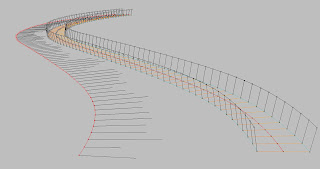
Creating geometry for Finite Element Analysis (FEA). FEA is a computer simulation technique used in engineering analysis (straight from Wiki...) It requires all the line geometries to be meeting at points. If you are Osnap-ing manually, there is high chance that you miss a couple. So, here it is. Out of spline and two offset splines, this script creates basic structure for a bridge.
User has to provide with manually-built normals at each division point. Length doesn't matter. It is to show direction only, and will be deleted by the end of the script.
Challenge:
_Confusion between stringPt and arrPt
_Playing with Layer method
_In Loop, lines require to refer a point from previous round
'----------------------------------------------------------------------------------------------
'----------------------------------------------------------------------------------------------
Option Explicit
'Author: YukiukiH
'Date: 06/28/2008
'compatibility: Rhino4
'memo: watch arrPt and strPt
'before run...
'1. given spline.
'2. divide spline.
'3. draw normal at each points. (use perpendicular to curve/ from first point)
bridgeSt
Sub bridgeSt
'first things first...
Rhino.AddLayer "splineCenter", RGB(255,0,0) 'black
Rhino.AddLayer "centerPt", RGB(0,0,0) 'black
Rhino.AddLayer "normalAxis", RGB(0,0,0) 'black
Rhino.AddLayer "normal01", RGB(255,161,0) 'gold
Rhino.AddLayer "normal02", RGB(255,127,0) 'orange
Rhino.AddLayer "side01", RGB(0,0,0) 'black
Rhino.AddLayer "side02", RGB(0,0,0) 'black
Rhino.AddLayer "Pt", RGB(0,0,0) 'black
Rhino.AddLayer "Line011", RGB(63,191,191) 'turquoise
Rhino.AddLayer "Line022", RGB(63,191,191) 'turquoise
Rhino.AddLayer "Line033", RGB(0,0,0) 'black
Rhino.AddLayer "Line044", RGB(0,0,0) 'black
Rhino.AddLayer "Line055", RGB(255,0,0) 'red
'organizing object layers
Dim strSpline, arrstrCenPt, arrstrNormalAxis
Dim arrPt, arrPts, strCenPt, dblLength
strSpline = Rhino.GetObject ("select a spline curve", 4)
Rhino.ObjectLayer strSpline , "splineCenter"
Rhino.LayerVisible "splineCenter", False
arrstrCenPt = Rhino.GetObjects ("select center points", 1)
Rhino.ObjectLayer arrstrCenPt , "centerPt"
Rhino.CurrentLayer ("CenterPt")
Rhino.DeleteObjects arrstrCenPt
'by length segment
dblLength = 1500
arrPts = Rhino.DivideCurveLength(strSpline, dblLength)
'by segments
'intSegments = 130
'arrPoints = Rhino.DivideCurve(strSpline, intSegments)
For Each arrPt In arrPts
strCenPt = Rhino.AddPoint (arrPt)
Next
arrstrNormalAxis = Rhino.GetObjects ("select normal lines IN ORDER", 4)
Rhino.ObjectLayer arrstrNormalAxis , "normalAxis"
'at each point...
Dim i, arrNormalAxisStPt, arrNormalAxisEdPt
Dim strLine01, strLine02, arrSt(2), arrEd(2), arrReference(1), arrTarget(1)
arrSt(0) = 0
arrSt(1) = 0
arrSt(2) = 0
arrEd(0) = 2000 'bridge width
arrEd(1) = 0
arrEd(2) = 0
For i = 0 To UBound (arrstrNormalAxis)
'create vector out of string normal, and orient lines
arrNormalAxisStPt = Rhino.CurveStartPoint (arrstrNormalAxis(i))
arrNormalAxisEdPt = Rhino.CurveEndPoint (arrstrNormalAxis(i))
Rhino.LayerVisible "normalAxis", False
arrReference(0) = arrSt
arrReference(1) = arrEd
arrTarget(0) = arrNormalAxisStPt
arrTarget(1) = arrNormalAxisEdPt
Rhino.CurrentLayer ("normal01")
strLine01 = Rhino.AddLine (arrSt, arrEd)
Rhino.OrientObject strLine01, arrReference, arrTarget
Rhino.CurrentLayer ("normal02")
strLine02 = Rhino.AddLine (arrSt, arrEd)
Rhino.OrientObject strLine02, arrReference, arrTarget
Rhino.RotateObject strLine02, arrNormalAxisStPt, 180
'prepare vector for 3d rotation
Dim arrLine01EdPt, arrLine02EdPt
Dim strLine01axis, strLine02axis
Dim arrLine01StPt, arrLine02StPt, arrAxis01, arrAxis02
Dim strLine01vrt, strLine02vrt
arrLine01EdPt = Rhino.CurveEndPoint (strLine01)
arrLine02EdPt = Rhino.CurveEndPoint (strLine02)
strLine01axis = Rhino.RotateObject (strLine01, arrLine01EdPt, 90,, True)
strLine02axis = Rhino.RotateObject (strLine02, arrLine02EdPt, 90,, True)
arrLine01StPt = Rhino.CurveStartPoint (strLine01axis)
arrLine02StPt = Rhino.CurveStartPoint (strLine02axis)
arrAxis01= Rhino.VectorCreate (arrLine01EdPt, arrLine01StPt)
arrAxis02= Rhino.VectorCreate (arrLine02EdPt, arrLine02StPt)
strLine01vrt = Rhino.CopyObject(strLine01)
Rhino.ObjectLayer strLine01vrt, "side01"
Rhino.RotateObject strLine01vrt, arrLine01EdPt, 100, arrAxis01
strLine02vrt = Rhino.CopyObject(strLine02)
Rhino.ObjectLayer strLine02vrt, "side02"
Rhino.RotateObject strLine02vrt, arrLine02EdPt, 100, arrAxis02
Rhino.DeleteObject (strLine01axis)
Rhino.DeleteObject (strLine02axis)
'add string points
Dim arrStPtLine01vrt, arrStPtLine02vrt, arrEdPtLine01vrt, arrEdPtLine02vrt
Dim strStPtLine01vrt, strStPtLine02vrt, strEdPtLine01vrt, strEdPtLine02vrt
Rhino.CurrentLayer ("Pt")
arrStPtLine01vrt = Rhino.CurveStartPoint (strLine01vrt)
arrStPtLine02vrt = Rhino.CurveStartPoint (strLine02vrt)
strStPtLine01vrt = Rhino.AddPoint (arrStPtLine01vrt)
strStPtLine02vrt = Rhino.AddPoint (arrStPtLine02vrt)
arrEdPtLine01vrt = Rhino.CurveEndPoint (strLine01vrt)
arrEdPtLine02vrt = Rhino.CurveEndPoint (strLine02vrt)
strEdPtLine01vrt = Rhino.AddPoint (arrEdPtLine01vrt)
strEdPtLine02vrt = Rhino.AddPoint (arrEdPtLine02vrt)
'create lines between current(B) and previous(A)
Dim strLine011, arrLine011PtA, arrLine011PtB, arrpt011PtAtemp
Dim strLine022, arrLine022PtA, arrLine022PtB, arrpt022PtAtemp
Dim strLine033, arrLine033PtA, arrLine033PtB, arrpt033PtAtemp
Dim strLine044, arrLine044PtA, arrLine044PtB, arrpt044PtAtemp
Dim strLine055, arrLine055PtA, arrLine055PtB, arrpt055PtAtemp
Dim strEdPtVrt03, strEdPtVrt04
'prepare current(B) and previous(A)points
If i = 0 Then
'BTM line (Line011, 022)
arrLine011PtA = arrLine01EdPt
arrLine022PtA = arrLine02EdPt
'TP line (Line 033, 044)
arrLine033PtA = Rhino.CurveStartPoint (strLine01vrt)
arrLine044PtA = Rhino.CurveStartPoint (strLine02vrt)
'MD line (Line 055)
arrLine055PtA = arrPts(i)
Else
'BTM line (Line011, 022)
arrpt011PtAtemp = arrLine01EdPt
arrpt022PtAtemp = arrLine02EdPt
arrLine011PtB = arrpt011PtAtemp
arrLine022PtB = arrpt022PtAtemp
'TP line (Line 033, 044)
arrpt033PtAtemp = Rhino.CurveStartPoint (strLine01vrt)
arrpt044PtAtemp = Rhino.CurveStartPoint (strLine02vrt)
arrLine033PtB = arrpt033PtAtemp
arrLine044PtB = arrpt044PtAtemp
'MD line (Line 055)
arrpt055PtAtemp = arrPts(i)
arrLine055PtB = arrpt055PtAtemp
'add line (Line 011, 022, 033, 044, 055)
Rhino.CurrentLayer ("Line011")
strLine011 = Rhino.AddLine (arrLine011PtA, arrLine011PtB)
Rhino.CurrentLayer ("Line022")
strLine022 = Rhino.AddLine (arrLine022PtA, arrLine022PtB)
Rhino.CurrentLayer ("Line033")
strLine033 = Rhino.AddLine (arrLine033PtA, arrLine033PtB)
Rhino.CurrentLayer ("Line044")
strLine044 = Rhino.AddLine (arrLine044PtA, arrLine044PtB)
Rhino.CurrentLayer ("Line055")
strLine055 = Rhino.AddLine (arrLine055PtA, arrLine055PtB)
' prepare for next round
'BTM line (Line011, 022)
arrLine011PtA = arrLine011PtB
arrLine022PtA = arrLine022PtB
'TP line (Line033, 044)
arrLine033PtA = arrLine033PtB
arrLine044PtA = arrLine044PtB
'MD line (Line055)
arrLine055PtA = arrLine055PtB
End If
Next
End Sub

Having hard time with drawing normal (of the main spline) at each division point I ended up intersecting circle and offset splines. So when I first offset the main spline, I had to set offset tolerance high, at least more than default otherwise intersection fails.
'----------------------------------------------------------------------------------------------
'----------------------------------------------------------------------------------------------
Option Explicit
'Author: YukiukiH
'Date: 06/21/2008
'compatibility: Rhino4
'memo: watch arrPt and strPt
bridgeSt
Sub bridgeSt
'first things first...
Rhino.AddLayer "centerPt", RGB(0,0,0) 'black
Rhino.AddLayer "circle", RGB(105,105,105) 'darl gray
Rhino.AddLayer "normal01", RGB(255,161,0) 'gold
Rhino.AddLayer "normal02", RGB(255,127,0) 'orange
Rhino.AddLayer "Pt", RGB(0,0,0) 'black
Rhino.CurrentLayer ("centerPt")
'divide bridge spline into segments (by length or segments)
Dim strSpline, dblLength, intSegments
Dim strOffset01, strOffset02
Dim arrPts, arrPt, strCenPt
strSpline = Rhino.GetObject("Select a curve")
strOffset01 = Rhino.GetObject("Select the first offset curve")
strOffset02 = Rhino.GetObject("Select the second offset curve")
Call Rhino.LayerVisible ("splineCenter", False)
Call Rhino.LayerVisible ("splineOffset", False)
If Rhino.IsCurve(strSpline) Then
'by length segment
dblLength = 1500
arrPts = Rhino.DivideCurveLength(strSpline, dblLength)
'by segments
'intSegments = 130
'arrPoints = Rhino.DivideCurve(strSpline, intSegments)
For Each arrPt In arrPts
strCenPt = Rhino.AddPoint (arrPt)
Next
End If
'Ultimate Loop
'----------------------------------------------------------------------------------------------
'----------------------------------------------------------------------------------------------Dim i, k
For i = 0 To UBound(arrPts)
'intersection (circle and offset spline) finds normal
Dim strCircle, arrPlane, arrInterPt01, arrInterPt02
arrPlane = Rhino.WorldXYPlane
strCircle = Rhino.AddCircle (arrPlane, 2000)
Call Rhino.ObjectLayer (strCircle, "circle")
Rhino.MoveObject strCircle, Array(0,0,0), arrPts(i)
Rhino.CurrentLayer ("Pt")
arrInterPt01 = Rhino.CurveCurveIntersection(strOffset01, strCircle)
If Not IsArray(arrInterPt01) Then
Rhino.Print "Selected curves do not intersect"
Exit Sub
End If
If arrInterPt01(k,0) = 1 Then
Rhino.Print "Intersection point on first curve: " & Rhino.Pt2Str(arrInterPt01(k,1))
Rhino.AddPoint arrInterPt01(k,1)
Else
Rhino.Print "Overlap"
Exit Sub
End If
arrInterPt02 = Rhino.CurveCurveIntersection(strOffset02, strCircle)
If Not IsArray(arrInterPt02) Then
Rhino.Print "Selected curves do not intersect"
Exit Sub
End If
If arrInterPt02(k,0) = 1 Then
Rhino.Print "Intersection point on first curve: " & Rhino.Pt2Str(arrInterPt02(k,1))
Rhino.AddPoint arrInterPt02(k,1)
Else
Rhino.Print "Overlap"
Exit Sub
End If
'add normal line
Dim strLine01, strLine02, strLine01axis, strLine02axis
Dim arrStPtLine01, arrStPtLine02, arrAxis01, arrAxis02
Dim strLine01vrt, strLine02vrt
Rhino.CurrentLayer ("normal01")
strLine01 = Rhino.AddLine (arrPts(i), arrInterPt01(k,1))
Rhino.CurrentLayer ("normal02")
strLine02 = Rhino.AddLine (arrPts(i), arrInterPt02(k,1))
Next
'----------------------------------------------------------------------------------------------
'----------------------------------------------------------------------------------------------
Call Rhino.LayerVisible ("splineCenter", True)
Call Rhino.LayerVisible ("splineOffset", True)
Call Rhino.print ("script complete")
End Sub


Here is another practical script for making physical models. I have to explode polylines manually first, then select the segment curves in order to layout for print (with little markers). Since "orient curve" command keeps working in a Loop, I have to Esc out the script, or simply reDim "i" manually for every round.
Option Explicit
layoutPolyline
Sub layoutPolyline
Dim strLine01, strLine02, strLineSave, i, j, arrReference, arrTarget
Dim arrCurve01S, arrCurve01E, arrCurve02S, arrCurve02E
Dim arrTarget1, arrTarget2, strMarker
i = 4
j = i + 0.75
'select an initial line to duplicate and hide
strLine01 = Rhino.GetObject ("select a line", 4)
strLineSave = Rhino.CopyObject (strLine01)
Call Rhino.HideObject(strLineSave)
'orient the line
arrCurve01S = Rhino.CurveStartPoint (strLine01)
arrCurve01E = Rhino.CurveEndPoint (strLine01)
arrReference = Array (arrCurve01S,arrCurve01E)
arrTarget1 = Array (0,-i, 0)
arrTarget2 = Array (99999,-i, 0)
arrTarget = Array (arrTarget1,arrTarget2)
strLine01 = Rhino.OrientObject (strLine01, arrReference, arrTarget)
strMarker = Rhino.AddLine (arrTarget1, Array(0,-j,0))
'select the succeding lines in order
Do
'duplicate and hide
strLine02 = Rhino.GetObject ("select the next line", 4)
strLineSave = Rhino.CopyObject (strLine02)
Call Rhino.HideObject(strLineSave)
'orient lines
arrCurve02S = Rhino.CurveStartPoint (strLine02)
arrCurve02E = Rhino.CurveEndPoint (strLine02)
arrReference = Array (arrCurve02S,arrCurve02E)
arrTarget1 = Array (0,-i, 0)
arrTarget2 = Array (99999,-i, 0)
arrTarget = Array (arrTarget1,arrTarget2)
strLine02 = Rhino.OrientObject (strLine02, arrReference, arrTarget)
arrCurve01S = Rhino.CurveStartPoint (strLine01)
arrCurve01E = Rhino.CurveEndPoint (strLine01)
arrCurve02S = Rhino.CurveStartPoint (strLine02)
arrCurve02E = Rhino.CurveEndPoint (strLine02)
Call Rhino.MoveObject (strLine02, arrCurve02S, arrCurve01E)
Call Rhino.CopyObject (strMarker, arrTarget1, arrCurve01E)
strLine01 = strLine02
Loop
End Sub

Recent progress in rvb. As it's explained in script, 1. create sphere in spiral, and scale accordingly2. draw 2d line, rotate, and move3. rotate sphere in 3Dthats all. Enjoy.Option Explicit
addVector()Sub addVector() Dim arrCoordinate(2), arrPoint(), arrSphere(), arrScaleSphere() Dim arrLine(), arrSt(2), arrEd(2), arrRotateLine(), dblAngle Dim arrFinSphere(), arrAxis(), arrLineEd() Dim i, t, pi, arrScale Dim A, B, C i = 0 dblAngle = 30 For t = -5 To 6 Step 0.05'create sphere in spiral, and scale accordingly '''''''''''''''''''''''''''''''''''''''''''''''''''''''''''''''''''''' A = 1 B = 1 C = t+5 arrScale = Array(A, B, C) arrCoordinate(0) = t*Sin(5*t) arrCoordinate(1) = t*Cos(5*t) arrCoordinate(2) = t 'ReDim Preserve arrPoint(i) 'arrPoint(i) = Rhino.AddPoint(arrCoordinate) 'don't need a string of point to draw a sphere ReDim Preserve arrSphere(i) arrSphere(i) = Rhino.AddSphere(arrCoordinate, 0.25) ReDim Preserve arrScaleSphere(i) arrScaleSphere(i) = Rhino.ScaleObject(arrSphere(i), arrCoordinate, arrScale) 'draw 2d line, rotate, and move '''''''''''''''''''''''''''''''''''''''''''''''''''''''''''''''''''''''''''''''''''''''''''''''''''''''''' arrSt(0) = arrCoordinate(0) arrSt(1) = arrCoordinate(1) arrSt(2) = 0 arrEd(0) = 0 arrEd(1) = 0 arrEd(2) = 0 ReDim Preserve arrLine(i) arrLine(i) = Rhino.AddLine(arrSt, arrEd) ReDim Preserve arrRotateLine(i) arrRotateLine(i) = Rhino.RotateObject(arrLine(i), arrSt, 90) Call Rhino.MoveObject (arrLine(i), arrSt, arrCoordinate) 'rotate sphere in 3d ''''''''''''''''''''''''''''''''''''''''''''''''''''''''''''''''''''''''''''''''''''''''''''''''''''''''''''''''''''''''''''''''''''''''''' ReDim Preserve arrLineEd(i) arrLineEd(i) = Rhino.CurveEndPoint (arrLine(i)) ReDim Preserve arrAxis(i) arrAxis(i)= Rhino.VectorCreate (arrCoordinate, arrLineEd(i)) ReDim Preserve arrFinSphere(i) arrFinSphere(i) = Rhino.RotateObject (arrScaleSphere(i), arrCoordinate, dblAngle, arrAxis(i)) i = i+1NextEnd Sub

The following is the script to construct this mess. I modeled a polygon lattice in Maya with multiple deformer. In Rhino, the script allows me to select those lines in order to lay them out. I printed those lines and cut wood sticks accordingly.
NO measuring! Saved my ass.

Option Explicit
Sub orientCurve
Dim strLine, i, arrReference, arrTarget
Dim strCurveS, strCurveE, strTarget1, strTarget2
i = 4
Do
'select lines in order
strLine = Rhino.GetObject ("select a line", 4)
'orient lines
strCurveS = Rhino.CurveStartPoint (strLine)
strCurveE = Rhino.CurveEndPoint (strLine)
arrReference = Array (strCurveS,strCurveE)
strTarget1 = Array (0,-i, 0)
strTarget2 = Array (99999,-i, 0)
arrTarget = Array (strTarget1,strTarget2)
i = i + 0.25
Call Rhino.OrientObject (strLine, arrReference, arrTarget)
Loop
End Sub
orientCurve

This Script takes a bunch of lines and populates another curve to them. Recommended for lasercut.Option ExplicitCall Populate()Sub Populate() Dim Object, ArrLines, i, Popstart, PopEnd, RefPoints, strScale, strOptions, RefObject strOptions = Array ("y", "n") Object = Rhino.GetObject ("Select Populate Object", 4) RefObject = Rhino.GetObject ("Select Reference line for Population", 4) ArrLines = Rhino.GetObjects ("Select target Curves", 4) strScale = Rhino.GetString ("Do you want to Scale", "y", strOptions) Popstart = Rhino.CurveStartPoint(RefObject) PopEnd = Rhino.CurveEndPoint(RefObject) RefPoints = Array(Popstart, Popend) For i = 0 To UBound(arrLines) Call Copypop(Object, arrlines(i), Refpoints, strScale) Call Rhino.DeleteObject(arrlines(i)) NextEnd Sub Function CopyPop(Object, Target, Refpoints, strScale) Dim startPoint, endPoint, TargetPoint, PopCurve, tempCrv, refDist startPoint = Rhino.CurveStartPoint(target) endPoint = Rhino.CurveEndPoint(target) TargetPoint = Array(startPoint, endPoint) refDist = Rhino.Distance (Refpoints(0), RefPoints(1)) If strScale = "n" Then Dim targetDist, scalefactor targetDist = Rhino.Distance(TargetPoint(0), TargetPoint(1)) scalefactor = TargetDist/Refdist tempCrv = Rhino.ScaleObject(Object, RefPoints(0),Array(scalefactor,1,1) ,vbTrue) PopCurve = Rhino.OrientObject(TempCrv, RefPoints, TargetPoint) Else PopCurve = Rhino.OrientObject(Object, RefPoints, TargetPoint, 3) End IfEnd Function


